
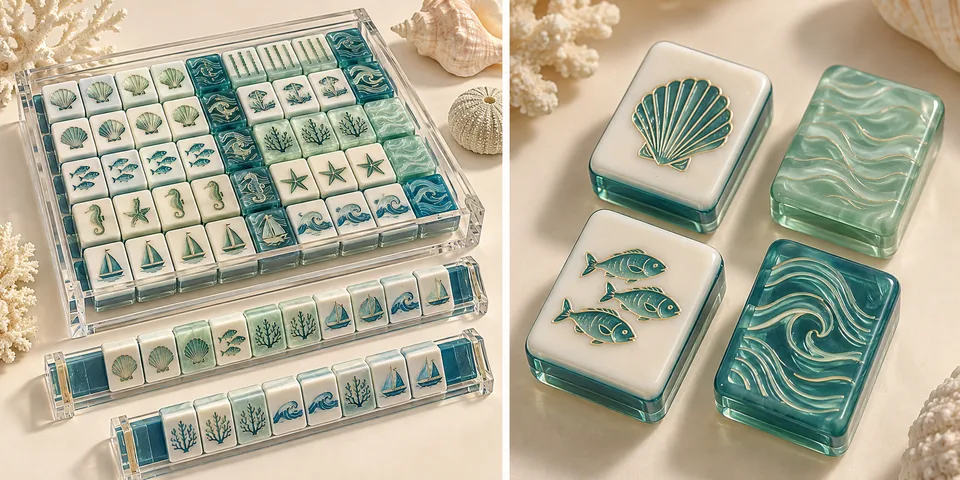
One tile design can become several distinct mahjong colorways, but approving the artwork does not approve every color combination. Before ordering, give each version its own component list, physical color references and sample decision. Keep the common artwork revision separate from the colors, materials and accessories that change.
This checklist helps brand owners and buyers answer a practical question: what exactly has been approved for each colorway, and what still needs checking?
1. Separate the shared design from the colorway specification
Start with a master design record: tile faces and counts, dimensions, artwork revision, placement of numbers and symbols, and the proposed decoration methods. Then create a separate sheet for each colorway. A name such as “Coastal Blue” is useful for merchandising, but it is not a production instruction.
Identify the face, back and each visible layer individually. State whether a reference describes the acrylic material, an engraved paint-filled area, a printed illustration or an accessory. The same color name used in these different places does not establish that they will look identical.
If you change dimensions, layer construction or decoration method, record that as a specification change as well as a palette change. Use the design file checklist to keep artwork handover details together.
2. Make a component-by-component approval sheet
Use the following fields for every version. The entries are planning prompts, not a list of standard MahjCustom product specifications.
| Component | Record before sampling | Check on the proposed sample |
|---|---|---|
| Tile face | Material, finish and reference ID | Background appearance and contrast with the markings |
| Middle and back layers | Layer order, individual color references and agreed dimensions | Side view, orientation and the finished combination |
| Numbers and symbols | Artwork revision, color allocation and decoration method | Readability, edges and consistency across tile types |
| Detailed illustrations | Separate artwork layers and printed/engraved areas | Position, small details and appearance on the selected base |
| Racks and pushers | Item reference, material, color and fit requirements | Appearance beside the tiles and fit with the proposed set |
| Bag, box and insert | Component version, print file and packing layout | Correct colorway identification and fit of the complete contents |
A useful record also names the reviewer, sample ID, review date and decision. Keep “approved,” “revise” and “not yet checked” separate. An approval for tile color should not silently become approval for a bag or printed box that has not been reviewed.
3. Review physical references as a combination
A digital palette communicates direction. It does not replace a check of the proposed materials and decoration together. Where a Pantone reference is used, record the reference system and code, then identify the physical sample that will govern the final decision.
For translucent acrylic, compare the proposed sample against the same background and under consistent lighting. For pearlescent effects, look from several angles; a single edited photograph can miss changes in appearance. Record which photographs or videos support the decision, and distinguish them from the retained physical reference.
Review face, back, side layers and accessories together. A rack can coordinate with a tile without being an exact match, but that relationship should be intentional. Write down whether you want a close match, a contrasting accent or a related tone instead of leaving “matching accessories” open to interpretation.
4. Recheck readability when the palette changes
A motif that reads clearly in a dark color on a light face may become difficult to distinguish in a different combination. Look at numbers, suit markings, fine outlines and small filled areas on representative tiles. Review the set in its intended playing position as well as in close-up photographs.
Keep the decoration plan visible in the approval record. For designs combining engraving and printing, identify the engraved outlines or numbers separately from printed gradients and detailed illustrations. Check alignment and appearance on the proposed sample rather than assuming that approval of one process covers the other.
If the palette change makes a detail unclear, resolve whether to adjust the color, simplify the artwork or review a different decoration approach. See the engraving and UV printing comparison for questions to include in that discussion.
5. Agree what each sample is intended to prove
A material chip can help review a material color. A decorated tile can help review artwork, contrast and finish on that tile. A complete set can reveal component mismatches, incorrect counts and packing problems that an individual tile does not show. Define the scope before paying for or approving a sample.
Changing only a back color is a different review task from changing the face material, layer structure and printing method together. Discuss which representative pieces are needed for each version and which decisions remain open. There is no universal rule that one approved colorway removes the need to review all others.
Use the sample approval checklist for the wider process. Keep the colorway decision attached to the same specification and artwork revision as the rest of the sample record.
6. Confirm quantities and change costs by version
When requesting a quotation, state the proposed quantity for each colorway and the combined quantity. Ask which minimums, material preparations, sample charges and packaging arrangements apply per version, and which can be shared. Do not assume that several palettes automatically count as one production quantity.
For a revision after approval, request a written review of the affected components, sample requirements, price and schedule before authorising the change. Treat “same artwork, new colors” as a description of the creative intention, not a promise of unchanged commercial terms.
An example of a clear approval record
Consider an illustrative collection with two versions, Harbor and Garden. Both use artwork revision A03. Harbor's decorated tile sample is accepted, while Garden's pale number fill needs another review. The box artwork is still open for both.
The record should say exactly that. It should not mark the whole collection “approved.” Give the revised Garden sample a new reference, keep Harbor's accepted reference, and record any shared artwork change that would also require Harbor to be checked again. This example is a planning exercise, not a completed customer project.
Before you release the order
- Confirm that every colorway has a unique name or SKU and an agreed quantity.
- Match each version to the correct tile list, artwork revision and component sheet.
- Identify the physical references and sample IDs covered by each approval.
- Resolve readability, orientation, accessory fit and packaging identification.
- Record remaining exceptions explicitly; do not treat silence as approval.
- Keep the approved records available for inspection and later reorder discussions.
FAQ
Can several mahjong colorways use the same artwork?
They can be planned around the same master artwork. Still record the colors, materials and decoration methods for each version. A change that affects legibility or production suitability may require an artwork revision and another sample review.
Is a screen image enough to approve a colorway?
Use it to communicate direction and identify changes. Agree suitable physical references and representative samples for the final decisions, especially where translucent materials, pearlescent effects or different component materials are involved.
Does every colorway need a complete sample set?
Agree the sample scope for the decisions you need to make. A chip, decorated tile and complete packed set answer different questions. Record what the chosen sample does and does not verify, and ask whether changed materials or construction require a wider check.
Can I add another colorway when I reorder?
Raise it as a new version linked to the existing approved specification. Confirm current material availability, quantities, sampling and commercial terms, and identify any differences from the previous order before approval.
Prepare your colorway brief
Bring your master artwork, proposed palettes, quantity per version and accessory ideas to a custom mahjong project discussion. If you already have samples, include their reference IDs and a short list of accepted and unresolved details.
Send your colorway brief to MahjCustom so the proposed configuration and sample scope can be reviewed together.